
XEMELGO SOFTWARE · PRODUCT DESIGN
Helping factory teams find and manage assets
with an IoT-powered software solution.
Redesigning Xemelgo’s web dashboard and mobile workflows to help factory teams see where assets are and which need attention.


Project Overview
MY ROLE
UX & Product Designer
TEAM
· 15 software engineers
· Product Manager
· Customer Success
· VP of Sales
· Chief Technology Officer
SCOPE
· Web Dashboard redesign
· Sidebar navigation redesign
· Asset onboarding (mobile app)
· Mobile cycle counting feature (mobile app)
STATUS & TIMELINE
Shipped; 3 month sprint
Outcomes
20x
Annual ROI
67%
Time Savings
100%
On-time Calibration
Operational Dashboard Redesign
BEFORE — Legacy dashboard

AFTER — Updated design

The Challenge
Asset tracking is hard to manage at scale. Factory teams needed the software to help with…
1.

2.

3.

How might we …help factory teams easily track assets
on across different factory layouts and tool types?
Research Insights
We visited 3 factories, interviewed users (Quality Managers, CEOs, Floor Supervisors), and mapped their current experience pain points and how Xemelgo solutions can help. We used those insights with input from Product and Customer Success, to shape personas and test whether Xemelgo met the needs of floor teams and executives.


Design Priorities
1.

2.


3.

Redesigning a more
useful asset tracking
experience across web and mobile
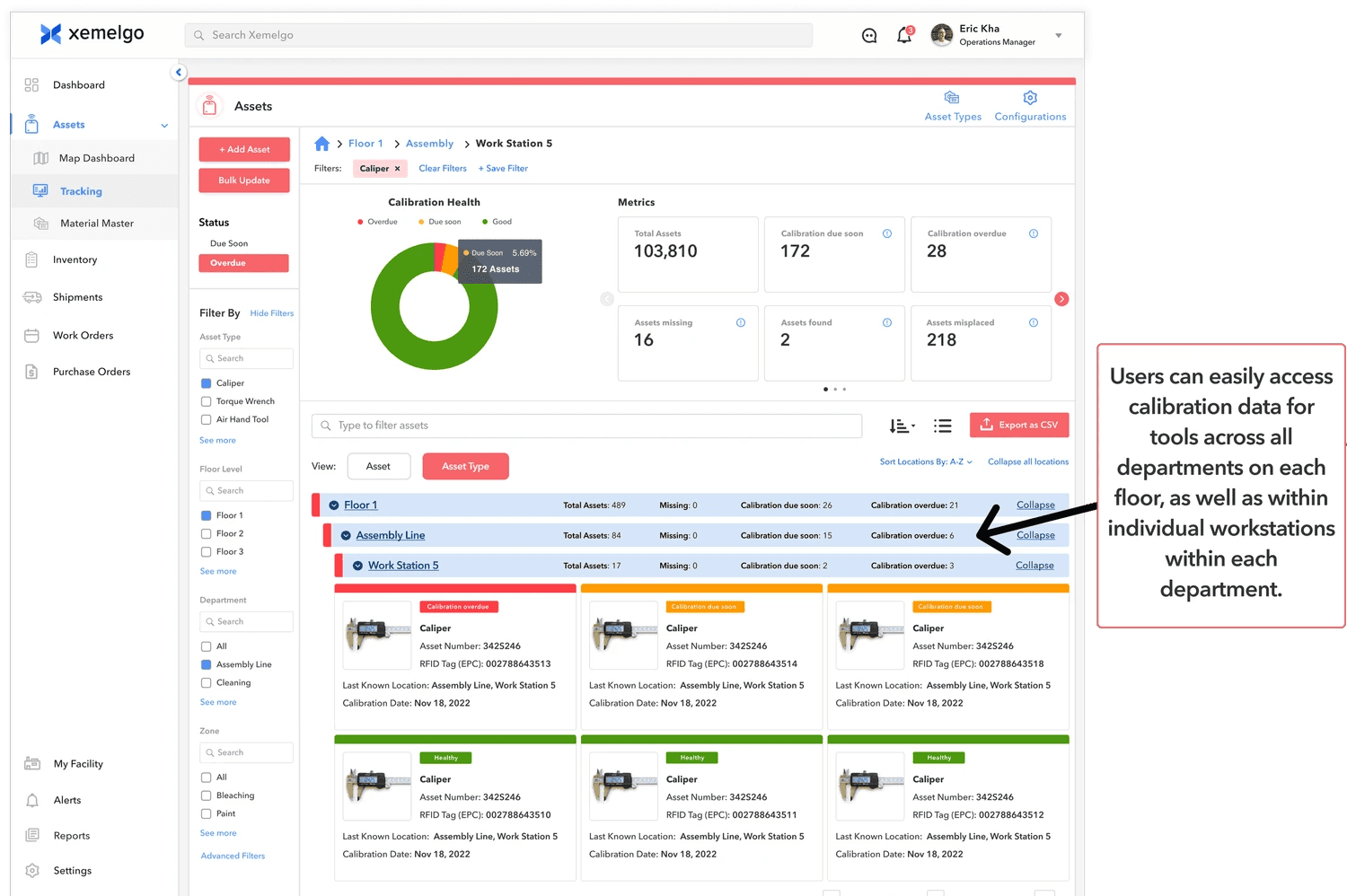
Find assets by location and status
I organized asset information by floor, department, and zone, making it easier to scan counts and see which tools need calibration.

Users now know how many assets are available in any department, zone or room and filter by it
Bringing more visibility into every area — showing which tools need calibration or are due soon, and where they’re located across the factory.
Supports factory teams that have equipment requiring multiple RFID tags
I updated mobile onboarding to support multiple tags on large equipment, helping teams track assets that need to be detected from different sides.

As platform expanded, the sidebar navigation was no longer scalable
Multiple features in the asset management tool was under the same product, sharing the same icon, making the different features indistinguishable in the collapsed state.


Sidebar navigation: Expanded State
I introduced a scalable icon system with unique visual identifiers for each feature (Asset Map and Tracking).
I separated Asset Map and Tracking with distinct icons so users could tell the workflows apart in the collapsed sidebar.
· Faster recognition
· Clearer navigation
· Stronger information hierarchy
What happens when you click a card? Seeing asset status at a glance
2 use cases: Calibration date tracking and Location tracking

Mobile app experience: Cycle counting
An asset cycle count is a check to make sure the tools listed in the system are actually where they’re supposed to be.
Workers scan tools in a selected area and compare them with the list in the app.


Mobile app experience: Find an Asset
Search in the app and use a handheld RFID scanner to locate a tool.
The entire solution in action with factory teams
RFID tags attached to tools communicate with mounted readers, updating asset locations in the web and mobile apps. On the factory floor, workers can search for a tool in the mobile app "Find Asset" feature and use a handheld RFID scanner to locate it.


Mounted RFID sensor readers, handheld RFID sensor scanner + mobile app, Xemelgo Web App on TV at factory
What customers valued in the redesign
Business customers highlighted time savings, ease of use, and strong ROI. Their feedback reinforced the value of making asset tracking simpler across web and mobile.
💡INSIGHTS:
· Business have high amounts of time savings
· Xemelgo Product is easy to use
· Overall high return on investment from using Xemelgo

20x
Annual ROI
67%
Time Savings
100%
On-time Calibration
